> ## Documentation Index
> Fetch the complete documentation index at: https://docs-dev-chore-tenant-logs-autoupdate.mintlify.site/llms.txt
> Use this file to discover all available pages before exploring further.

> Configure an update policy form using Forms for Actions

# Use Cases: Configure an update policy form using Forms

<Card title="Before you start">
  1. Create a [Machine-to-Machine Application](/docs/get-started/auth0-overview/create-applications/machine-to-machine-apps) with the following scopes enabled:

  * `read:users`
  * `update:users`
  * `create:users`
  * `read:users_app_metadata`
  * `update:users_app_metadata`
  * `create:users_app_metadata`

  2. Add a [Vault connection](/docs/customize/forms/vault) using the M2M application credentials.
</Card>

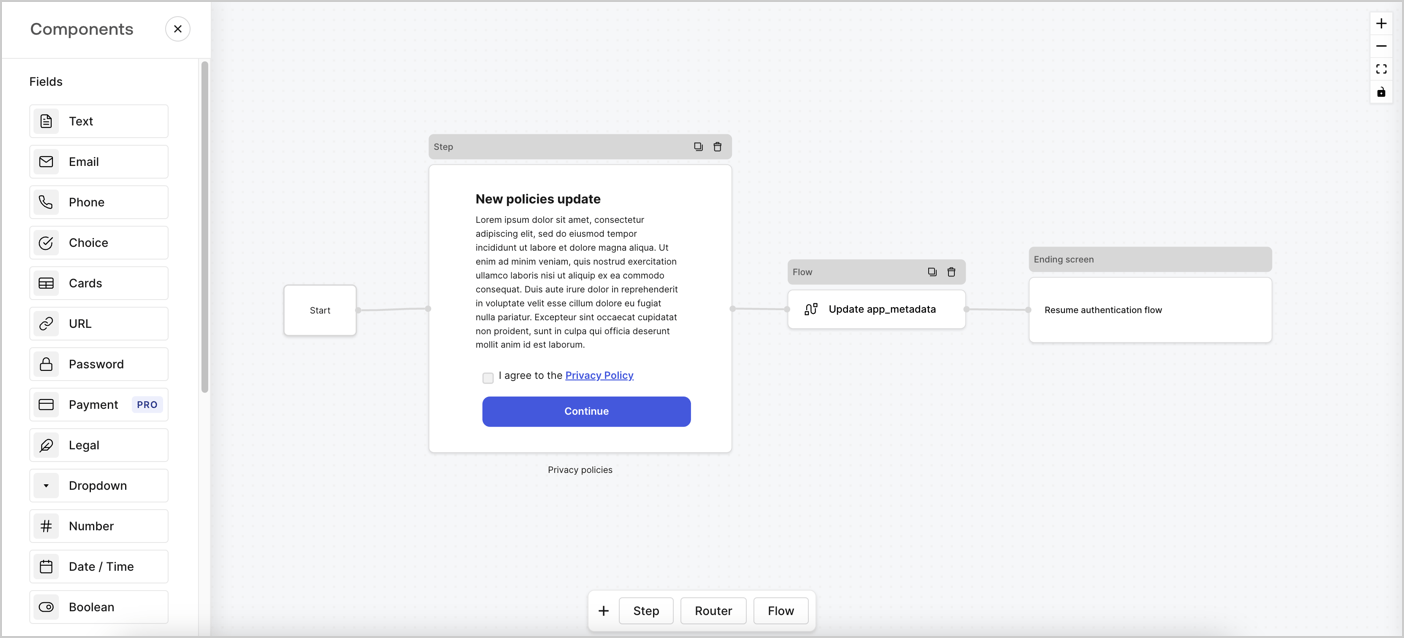
Forms for Actions allows you to create custom privacy policies flows and store the consent under the `app_metadata` object.
<Frame>
  <img src="https://mintcdn.com/docs-dev-chore-tenant-logs-autoupdate/dYxBiRIRMO-36sTi/docs/images/cdy7uua7fh8z/6i68dMvHDTijfRmSgN1x8Q/ad900e7d4c0fb34645921435472b8684/privavy-policy-form.png?fit=max&auto=format&n=dYxBiRIRMO-36sTi&q=85&s=b3b431bbfb7e3b079bafe24a34ad6960" alt="Dashboard > Actions > Forms > Privacy policy use case" data-og-width="1404" width="1404" data-og-height="638" height="638" data-path="docs/images/cdy7uua7fh8z/6i68dMvHDTijfRmSgN1x8Q/ad900e7d4c0fb34645921435472b8684/privavy-policy-form.png" data-optimize="true" data-opv="3" srcset="https://mintcdn.com/docs-dev-chore-tenant-logs-autoupdate/dYxBiRIRMO-36sTi/docs/images/cdy7uua7fh8z/6i68dMvHDTijfRmSgN1x8Q/ad900e7d4c0fb34645921435472b8684/privavy-policy-form.png?w=280&fit=max&auto=format&n=dYxBiRIRMO-36sTi&q=85&s=0fd9c205b2297328773aa0ae5ddb4eab 280w, https://mintcdn.com/docs-dev-chore-tenant-logs-autoupdate/dYxBiRIRMO-36sTi/docs/images/cdy7uua7fh8z/6i68dMvHDTijfRmSgN1x8Q/ad900e7d4c0fb34645921435472b8684/privavy-policy-form.png?w=560&fit=max&auto=format&n=dYxBiRIRMO-36sTi&q=85&s=80b6e91ad8db3e6e28300588d3386832 560w, https://mintcdn.com/docs-dev-chore-tenant-logs-autoupdate/dYxBiRIRMO-36sTi/docs/images/cdy7uua7fh8z/6i68dMvHDTijfRmSgN1x8Q/ad900e7d4c0fb34645921435472b8684/privavy-policy-form.png?w=840&fit=max&auto=format&n=dYxBiRIRMO-36sTi&q=85&s=b210f03071154ee8c63d42c30ced53a5 840w, https://mintcdn.com/docs-dev-chore-tenant-logs-autoupdate/dYxBiRIRMO-36sTi/docs/images/cdy7uua7fh8z/6i68dMvHDTijfRmSgN1x8Q/ad900e7d4c0fb34645921435472b8684/privavy-policy-form.png?w=1100&fit=max&auto=format&n=dYxBiRIRMO-36sTi&q=85&s=b636794dd5e68b908d8d97ac0936cc4b 1100w, https://mintcdn.com/docs-dev-chore-tenant-logs-autoupdate/dYxBiRIRMO-36sTi/docs/images/cdy7uua7fh8z/6i68dMvHDTijfRmSgN1x8Q/ad900e7d4c0fb34645921435472b8684/privavy-policy-form.png?w=1650&fit=max&auto=format&n=dYxBiRIRMO-36sTi&q=85&s=e57380ae3e3ce8b22e2513101d14f2e1 1650w, https://mintcdn.com/docs-dev-chore-tenant-logs-autoupdate/dYxBiRIRMO-36sTi/docs/images/cdy7uua7fh8z/6i68dMvHDTijfRmSgN1x8Q/ad900e7d4c0fb34645921435472b8684/privavy-policy-form.png?w=2500&fit=max&auto=format&n=dYxBiRIRMO-36sTi&q=85&s=ad82961e0f078e3beebc25d34fb0db0e 2500w" />
</Frame>

The sections below outline how you can create an Update Policy form using nodes and flows, along with steps for adding your form to a [Post Login](/docs/customize/actions/explore-triggers/signup-and-login-triggers/login-trigger) Action.

## Create a form from scratch

Follow these steps to create a form to gather information:

1. Open the Form editor by selecting **Auth0 Dashboard > Actions > Forms.**
2. Select **Create Form** > **Start from scratch**.

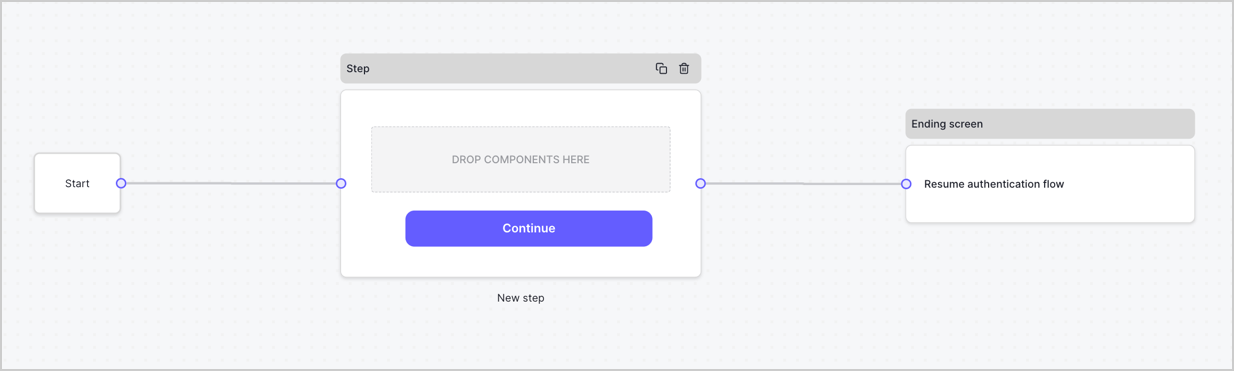
By default, a new form contains a Start node, a Step node, and an Ending screen node.
<Frame>
  <img src="https://mintcdn.com/docs-dev-chore-tenant-logs-autoupdate/3yC58mk9M48a08V4/docs/images/cdy7uua7fh8z/2TZ9jSjgEcARFpULI6hz4R/a4319a1bd482f2ee5cc23100fdb2f42c/New-form-Forms-for-action-use-case.png?fit=max&auto=format&n=3yC58mk9M48a08V4&q=85&s=8bcaaba4d657546ce5f1f629ade7e160" alt="Dashboard > Forms > Use Cases > Form" data-og-width="1234" width="1234" data-og-height="371" height="371" data-path="docs/images/cdy7uua7fh8z/2TZ9jSjgEcARFpULI6hz4R/a4319a1bd482f2ee5cc23100fdb2f42c/New-form-Forms-for-action-use-case.png" data-optimize="true" data-opv="3" srcset="https://mintcdn.com/docs-dev-chore-tenant-logs-autoupdate/3yC58mk9M48a08V4/docs/images/cdy7uua7fh8z/2TZ9jSjgEcARFpULI6hz4R/a4319a1bd482f2ee5cc23100fdb2f42c/New-form-Forms-for-action-use-case.png?w=280&fit=max&auto=format&n=3yC58mk9M48a08V4&q=85&s=70fecd136ad6f5acd779e0a1df353261 280w, https://mintcdn.com/docs-dev-chore-tenant-logs-autoupdate/3yC58mk9M48a08V4/docs/images/cdy7uua7fh8z/2TZ9jSjgEcARFpULI6hz4R/a4319a1bd482f2ee5cc23100fdb2f42c/New-form-Forms-for-action-use-case.png?w=560&fit=max&auto=format&n=3yC58mk9M48a08V4&q=85&s=ed81084d29419aecaea656b0edc8600a 560w, https://mintcdn.com/docs-dev-chore-tenant-logs-autoupdate/3yC58mk9M48a08V4/docs/images/cdy7uua7fh8z/2TZ9jSjgEcARFpULI6hz4R/a4319a1bd482f2ee5cc23100fdb2f42c/New-form-Forms-for-action-use-case.png?w=840&fit=max&auto=format&n=3yC58mk9M48a08V4&q=85&s=be36ac4be22957c225ae2c1eb16efcce 840w, https://mintcdn.com/docs-dev-chore-tenant-logs-autoupdate/3yC58mk9M48a08V4/docs/images/cdy7uua7fh8z/2TZ9jSjgEcARFpULI6hz4R/a4319a1bd482f2ee5cc23100fdb2f42c/New-form-Forms-for-action-use-case.png?w=1100&fit=max&auto=format&n=3yC58mk9M48a08V4&q=85&s=66fcd6884220500add0e9d240c3bd937 1100w, https://mintcdn.com/docs-dev-chore-tenant-logs-autoupdate/3yC58mk9M48a08V4/docs/images/cdy7uua7fh8z/2TZ9jSjgEcARFpULI6hz4R/a4319a1bd482f2ee5cc23100fdb2f42c/New-form-Forms-for-action-use-case.png?w=1650&fit=max&auto=format&n=3yC58mk9M48a08V4&q=85&s=45d37609f8807c64417a3d5900bf8a93 1650w, https://mintcdn.com/docs-dev-chore-tenant-logs-autoupdate/3yC58mk9M48a08V4/docs/images/cdy7uua7fh8z/2TZ9jSjgEcARFpULI6hz4R/a4319a1bd482f2ee5cc23100fdb2f42c/New-form-Forms-for-action-use-case.png?w=2500&fit=max&auto=format&n=3yC58mk9M48a08V4&q=85&s=4fe7a3a6626696eefec8b8d56f5ddf0f 2500w" />
</Frame>

### Configure the Step node

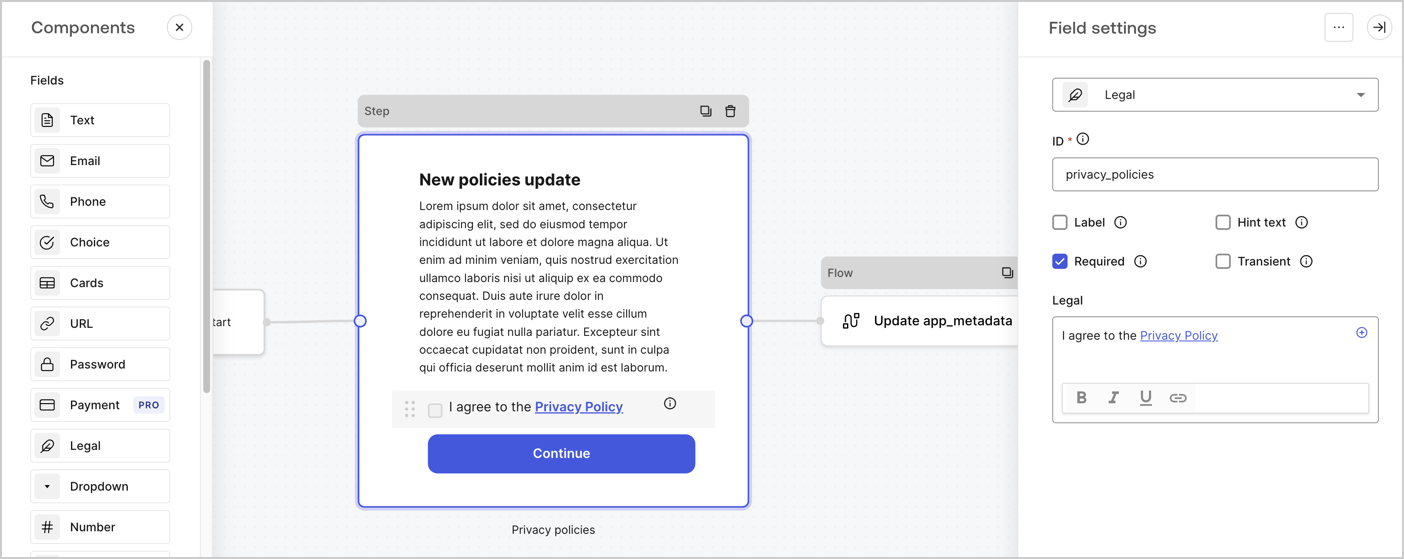
The Step node is the graphical interface visible to users. Add [Fields](/docs/customize/forms/nodes-and-components) to the Step node to collect the new agreement acceptance value by following these steps:

1. Drag a **Rich text** field from the **Components menu** into the **Step** node.

   * **Rich text**: Enter a description of your privacy policies updates.
   * Select **Save**.
2. Drag a **Legal** field into the **Step** node.

   * **ID**: Enter `privacy_policies`.
   * **Required**: Enable the checkbox.
   * **Legal**: Enter `I agree to the Privacy Policy`.
   * Select **Save**.
3. Select **Publish** to save.
<Frame>
  <img src="https://mintcdn.com/docs-dev-chore-tenant-logs-autoupdate/Hi-0ndKzNiJNGl_H/docs/images/cdy7uua7fh8z/59zFFjQjAnjogkc2QGIqqJ/0ad66b1b636544122aa4e65968b76c2c/privacy-policy-step-node.png?fit=max&auto=format&n=Hi-0ndKzNiJNGl_H&q=85&s=95919c285a2f91ad2e1d3b0530c84ea8" alt="Dashboard > Actions > Forms > Use case privacy policy step node" data-og-width="1404" width="1404" data-og-height="559" height="559" data-path="docs/images/cdy7uua7fh8z/59zFFjQjAnjogkc2QGIqqJ/0ad66b1b636544122aa4e65968b76c2c/privacy-policy-step-node.png" data-optimize="true" data-opv="3" srcset="https://mintcdn.com/docs-dev-chore-tenant-logs-autoupdate/Hi-0ndKzNiJNGl_H/docs/images/cdy7uua7fh8z/59zFFjQjAnjogkc2QGIqqJ/0ad66b1b636544122aa4e65968b76c2c/privacy-policy-step-node.png?w=280&fit=max&auto=format&n=Hi-0ndKzNiJNGl_H&q=85&s=4a227e7709763ff3cc60a47c287dcf87 280w, https://mintcdn.com/docs-dev-chore-tenant-logs-autoupdate/Hi-0ndKzNiJNGl_H/docs/images/cdy7uua7fh8z/59zFFjQjAnjogkc2QGIqqJ/0ad66b1b636544122aa4e65968b76c2c/privacy-policy-step-node.png?w=560&fit=max&auto=format&n=Hi-0ndKzNiJNGl_H&q=85&s=e27435bc74fe881102bbf5e1f82cc17b 560w, https://mintcdn.com/docs-dev-chore-tenant-logs-autoupdate/Hi-0ndKzNiJNGl_H/docs/images/cdy7uua7fh8z/59zFFjQjAnjogkc2QGIqqJ/0ad66b1b636544122aa4e65968b76c2c/privacy-policy-step-node.png?w=840&fit=max&auto=format&n=Hi-0ndKzNiJNGl_H&q=85&s=61d41af16918d9b16d134ef860877083 840w, https://mintcdn.com/docs-dev-chore-tenant-logs-autoupdate/Hi-0ndKzNiJNGl_H/docs/images/cdy7uua7fh8z/59zFFjQjAnjogkc2QGIqqJ/0ad66b1b636544122aa4e65968b76c2c/privacy-policy-step-node.png?w=1100&fit=max&auto=format&n=Hi-0ndKzNiJNGl_H&q=85&s=ff009c2b5df8df113850206e35766c3a 1100w, https://mintcdn.com/docs-dev-chore-tenant-logs-autoupdate/Hi-0ndKzNiJNGl_H/docs/images/cdy7uua7fh8z/59zFFjQjAnjogkc2QGIqqJ/0ad66b1b636544122aa4e65968b76c2c/privacy-policy-step-node.png?w=1650&fit=max&auto=format&n=Hi-0ndKzNiJNGl_H&q=85&s=ddebbdbffddb8dcc56e73e164f78e0f2 1650w, https://mintcdn.com/docs-dev-chore-tenant-logs-autoupdate/Hi-0ndKzNiJNGl_H/docs/images/cdy7uua7fh8z/59zFFjQjAnjogkc2QGIqqJ/0ad66b1b636544122aa4e65968b76c2c/privacy-policy-step-node.png?w=2500&fit=max&auto=format&n=Hi-0ndKzNiJNGl_H&q=85&s=57127c1d7bdd6b7ce28269f0480d96e1 2500w" />
</Frame>

### Configure the Flow node

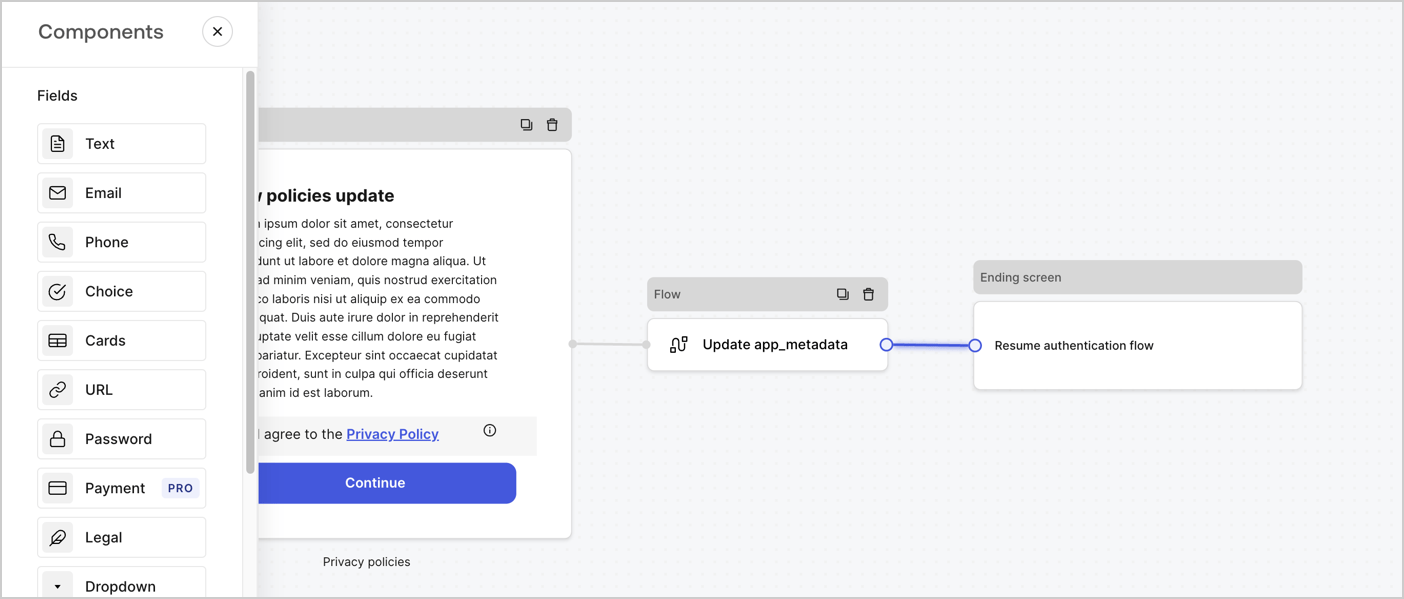
Add a **Flow** node after the **Step** node to update the `app_metadata` and resume the authentication flow by following these steps:

1. Select **Flow** from the bottom of the Form editor.
2. Remove the existing link between the **Step** and **Ending Screen** nodes.
3. Select the new **Flow** > **Click to add a flow** > **Create a new flow.**

   * Enter `Update app_metadata` in the **Name** field.
   * Select **Create**.
   * Select **Save**.
4. Link the **Flow** node to the **Step** and **Ending Screen** nodes as pictured below.
5. Select **Publish** to save.
<Frame>
  <img src="https://mintcdn.com/docs-dev-chore-tenant-logs-autoupdate/dYxBiRIRMO-36sTi/docs/images/cdy7uua7fh8z/6YIkzm7SrpM9LW76AXuRzh/353c518fe82bbaa440836da1d83596d6/link-policies.png?fit=max&auto=format&n=dYxBiRIRMO-36sTi&q=85&s=10338dbb41986936bae2d30499e6f1fb" alt="Dashboard > Actions > Forms > Form" data-og-width="1404" width="1404" data-og-height="599" height="599" data-path="docs/images/cdy7uua7fh8z/6YIkzm7SrpM9LW76AXuRzh/353c518fe82bbaa440836da1d83596d6/link-policies.png" data-optimize="true" data-opv="3" srcset="https://mintcdn.com/docs-dev-chore-tenant-logs-autoupdate/dYxBiRIRMO-36sTi/docs/images/cdy7uua7fh8z/6YIkzm7SrpM9LW76AXuRzh/353c518fe82bbaa440836da1d83596d6/link-policies.png?w=280&fit=max&auto=format&n=dYxBiRIRMO-36sTi&q=85&s=bc88294e505b51ef97cd2982f652ac04 280w, https://mintcdn.com/docs-dev-chore-tenant-logs-autoupdate/dYxBiRIRMO-36sTi/docs/images/cdy7uua7fh8z/6YIkzm7SrpM9LW76AXuRzh/353c518fe82bbaa440836da1d83596d6/link-policies.png?w=560&fit=max&auto=format&n=dYxBiRIRMO-36sTi&q=85&s=985ed2ff93428069f64d9e68981e2205 560w, https://mintcdn.com/docs-dev-chore-tenant-logs-autoupdate/dYxBiRIRMO-36sTi/docs/images/cdy7uua7fh8z/6YIkzm7SrpM9LW76AXuRzh/353c518fe82bbaa440836da1d83596d6/link-policies.png?w=840&fit=max&auto=format&n=dYxBiRIRMO-36sTi&q=85&s=fe6f421c8224a908c44d9eb4209232ee 840w, https://mintcdn.com/docs-dev-chore-tenant-logs-autoupdate/dYxBiRIRMO-36sTi/docs/images/cdy7uua7fh8z/6YIkzm7SrpM9LW76AXuRzh/353c518fe82bbaa440836da1d83596d6/link-policies.png?w=1100&fit=max&auto=format&n=dYxBiRIRMO-36sTi&q=85&s=d198adff2fd5a421f596654c1dac4908 1100w, https://mintcdn.com/docs-dev-chore-tenant-logs-autoupdate/dYxBiRIRMO-36sTi/docs/images/cdy7uua7fh8z/6YIkzm7SrpM9LW76AXuRzh/353c518fe82bbaa440836da1d83596d6/link-policies.png?w=1650&fit=max&auto=format&n=dYxBiRIRMO-36sTi&q=85&s=62920492b054a73a4ad1e8602b36e195 1650w, https://mintcdn.com/docs-dev-chore-tenant-logs-autoupdate/dYxBiRIRMO-36sTi/docs/images/cdy7uua7fh8z/6YIkzm7SrpM9LW76AXuRzh/353c518fe82bbaa440836da1d83596d6/link-policies.png?w=2500&fit=max&auto=format&n=dYxBiRIRMO-36sTi&q=85&s=d629a287cca25572ec9f3abd93b3f9f4 2500w" />
</Frame>

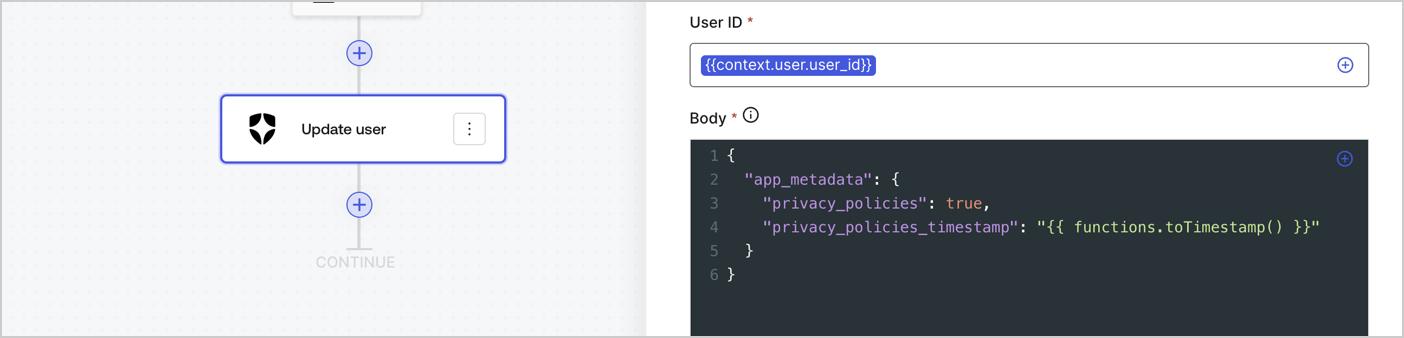
Add an Auth0 Update user action to the flow by following these steps:

1. Select the **Flow** **Update app\_metadata** > **Edit flow** to open the Flow editor in a new tab.
2. Below the StartAction, select the **+** icon to add an **Update user** action. Complete the fields below, then select **Save** to continue.

   * **Connection**: Select from the dropdown the Vault connection to your M2M application.

   * **User ID**: Enter `{{context.user.user_id}}`.

   * **Body**: Copy and paste the following code to update the app\_metadata with the privacy\_policies and privacy\_policies\_timestamp properties.

     ```text lines theme={null}
     {
       "app_metadata": {
         "privacy_policies": true,
         "privacy_policies_timestamp": "{{ functions.toTimestamp() }}"
       }
     }
     ```

   * Select **Save**.
3. Select **Publish** to save.
<Frame>
  <img src="https://mintcdn.com/docs-dev-chore-tenant-logs-autoupdate/gPfn-aF5JG-p5zP_/docs/images/cdy7uua7fh8z/CvMNIwWrOUwaFW4X3G28p/1fb70ae57a20749d9ffaaba8dc0b7e26/update-user-privacy.png?fit=max&auto=format&n=gPfn-aF5JG-p5zP_&q=85&s=4719c1bf01da52b59e7dee6c01e6d6c9" alt="Dashboard > Actions > Forms > User case privacy policy code" data-og-width="1404" width="1404" data-og-height="338" height="338" data-path="docs/images/cdy7uua7fh8z/CvMNIwWrOUwaFW4X3G28p/1fb70ae57a20749d9ffaaba8dc0b7e26/update-user-privacy.png" data-optimize="true" data-opv="3" srcset="https://mintcdn.com/docs-dev-chore-tenant-logs-autoupdate/gPfn-aF5JG-p5zP_/docs/images/cdy7uua7fh8z/CvMNIwWrOUwaFW4X3G28p/1fb70ae57a20749d9ffaaba8dc0b7e26/update-user-privacy.png?w=280&fit=max&auto=format&n=gPfn-aF5JG-p5zP_&q=85&s=941d99c1e85d6eaa4a3420d774ddcb5f 280w, https://mintcdn.com/docs-dev-chore-tenant-logs-autoupdate/gPfn-aF5JG-p5zP_/docs/images/cdy7uua7fh8z/CvMNIwWrOUwaFW4X3G28p/1fb70ae57a20749d9ffaaba8dc0b7e26/update-user-privacy.png?w=560&fit=max&auto=format&n=gPfn-aF5JG-p5zP_&q=85&s=15485b6c1c7f04ab1e13919410f75970 560w, https://mintcdn.com/docs-dev-chore-tenant-logs-autoupdate/gPfn-aF5JG-p5zP_/docs/images/cdy7uua7fh8z/CvMNIwWrOUwaFW4X3G28p/1fb70ae57a20749d9ffaaba8dc0b7e26/update-user-privacy.png?w=840&fit=max&auto=format&n=gPfn-aF5JG-p5zP_&q=85&s=bad747e79fede1b3a2d3325a28cfdca6 840w, https://mintcdn.com/docs-dev-chore-tenant-logs-autoupdate/gPfn-aF5JG-p5zP_/docs/images/cdy7uua7fh8z/CvMNIwWrOUwaFW4X3G28p/1fb70ae57a20749d9ffaaba8dc0b7e26/update-user-privacy.png?w=1100&fit=max&auto=format&n=gPfn-aF5JG-p5zP_&q=85&s=1a1eef680283ac4427f561f1b2f7a913 1100w, https://mintcdn.com/docs-dev-chore-tenant-logs-autoupdate/gPfn-aF5JG-p5zP_/docs/images/cdy7uua7fh8z/CvMNIwWrOUwaFW4X3G28p/1fb70ae57a20749d9ffaaba8dc0b7e26/update-user-privacy.png?w=1650&fit=max&auto=format&n=gPfn-aF5JG-p5zP_&q=85&s=02f44adcc83580961cf3f4e4ce1f94cb 1650w, https://mintcdn.com/docs-dev-chore-tenant-logs-autoupdate/gPfn-aF5JG-p5zP_/docs/images/cdy7uua7fh8z/CvMNIwWrOUwaFW4X3G28p/1fb70ae57a20749d9ffaaba8dc0b7e26/update-user-privacy.png?w=2500&fit=max&auto=format&n=gPfn-aF5JG-p5zP_&q=85&s=9e784f57fe4965614618c6de5b2238cd 2500w" />
</Frame>

<Callout icon="file-lines" color="#0EA5E9" iconType="regular">
  The flow **Update app\_metadata** adds a `privacy_policies true` value to the app`_metadata` object and also generates a timestamp with a [helper function.](/docs/customize/forms/variables)
</Callout>

## Retrieve the form render code

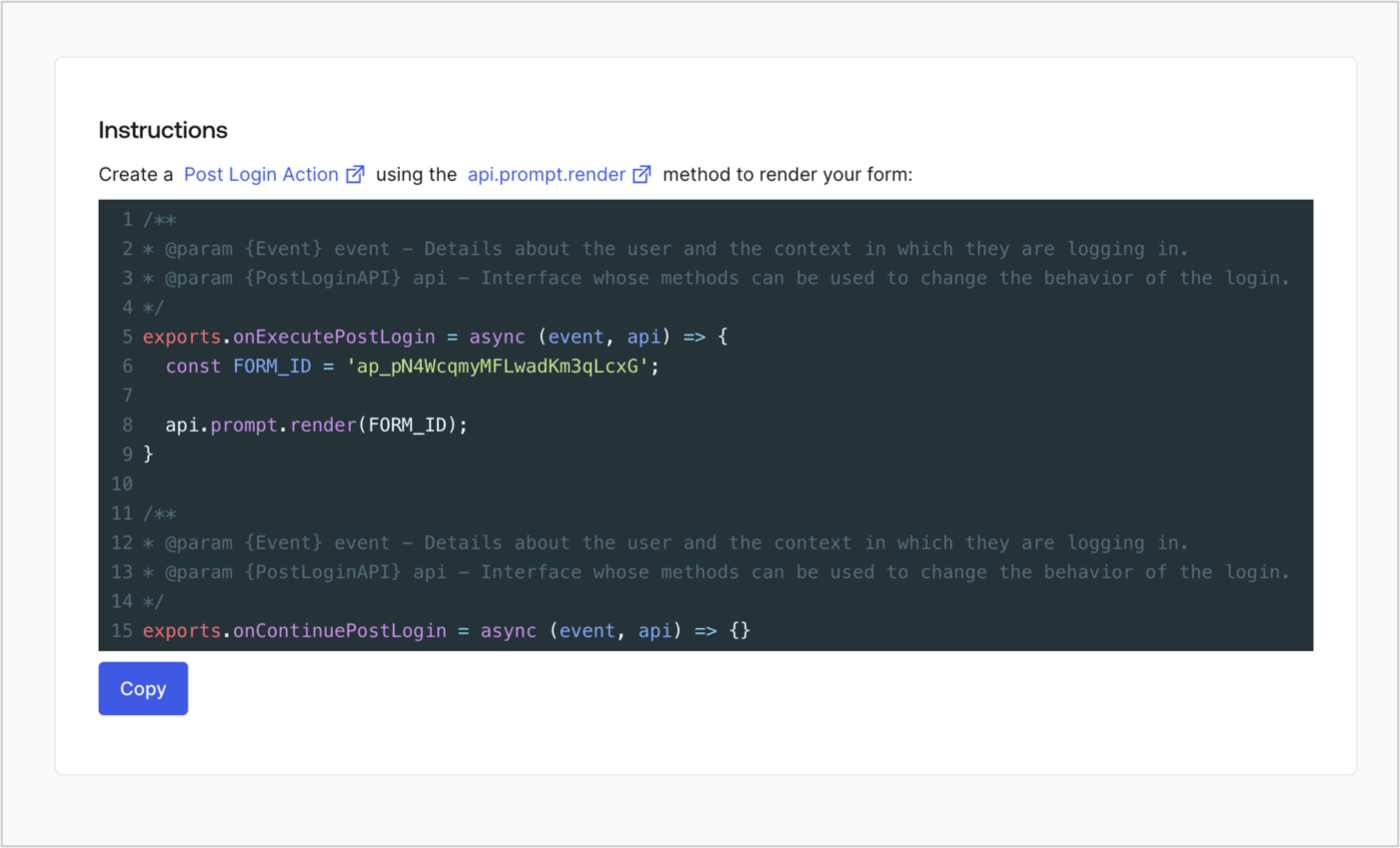
Retrieve your form render code to visually render the form with a custom Post Login Action by following these steps:

* From the Form editor, select **`<> Render`**.
* Select **Copy**.
<Frame>
  <img src="https://mintcdn.com/docs-dev-chore-tenant-logs-autoupdate/NZUpHyKlMp8tWVMg/docs/images/cdy7uua7fh8z/2EIUzc539sq9lwoTKbjoJv/496a864c0fc44a782c9cadca119dbfb0/embed.png?fit=max&auto=format&n=NZUpHyKlMp8tWVMg&q=85&s=e81fb6f0e9ece1983a8de4714b23a0d1" alt="Dashboard > Actions > Forms > Form > Embed" data-og-width="1400" width="1400" data-og-height="848" height="848" data-path="docs/images/cdy7uua7fh8z/2EIUzc539sq9lwoTKbjoJv/496a864c0fc44a782c9cadca119dbfb0/embed.png" data-optimize="true" data-opv="3" srcset="https://mintcdn.com/docs-dev-chore-tenant-logs-autoupdate/NZUpHyKlMp8tWVMg/docs/images/cdy7uua7fh8z/2EIUzc539sq9lwoTKbjoJv/496a864c0fc44a782c9cadca119dbfb0/embed.png?w=280&fit=max&auto=format&n=NZUpHyKlMp8tWVMg&q=85&s=142236c1f5380de9a5018f7b7b8af6d9 280w, https://mintcdn.com/docs-dev-chore-tenant-logs-autoupdate/NZUpHyKlMp8tWVMg/docs/images/cdy7uua7fh8z/2EIUzc539sq9lwoTKbjoJv/496a864c0fc44a782c9cadca119dbfb0/embed.png?w=560&fit=max&auto=format&n=NZUpHyKlMp8tWVMg&q=85&s=a3dae3620f674dffe981385a4f35241e 560w, https://mintcdn.com/docs-dev-chore-tenant-logs-autoupdate/NZUpHyKlMp8tWVMg/docs/images/cdy7uua7fh8z/2EIUzc539sq9lwoTKbjoJv/496a864c0fc44a782c9cadca119dbfb0/embed.png?w=840&fit=max&auto=format&n=NZUpHyKlMp8tWVMg&q=85&s=9c3eba0949fb4c7eeecdf231e5713536 840w, https://mintcdn.com/docs-dev-chore-tenant-logs-autoupdate/NZUpHyKlMp8tWVMg/docs/images/cdy7uua7fh8z/2EIUzc539sq9lwoTKbjoJv/496a864c0fc44a782c9cadca119dbfb0/embed.png?w=1100&fit=max&auto=format&n=NZUpHyKlMp8tWVMg&q=85&s=b2f02332aef095b7e3895bad859290d9 1100w, https://mintcdn.com/docs-dev-chore-tenant-logs-autoupdate/NZUpHyKlMp8tWVMg/docs/images/cdy7uua7fh8z/2EIUzc539sq9lwoTKbjoJv/496a864c0fc44a782c9cadca119dbfb0/embed.png?w=1650&fit=max&auto=format&n=NZUpHyKlMp8tWVMg&q=85&s=66b067d1741a707e8c0e899ad6e0a800 1650w, https://mintcdn.com/docs-dev-chore-tenant-logs-autoupdate/NZUpHyKlMp8tWVMg/docs/images/cdy7uua7fh8z/2EIUzc539sq9lwoTKbjoJv/496a864c0fc44a782c9cadca119dbfb0/embed.png?w=2500&fit=max&auto=format&n=NZUpHyKlMp8tWVMg&q=85&s=7c9f77e7067557de0b65bad3a575e337 2500w" />
</Frame>

## Create a Post Login Action

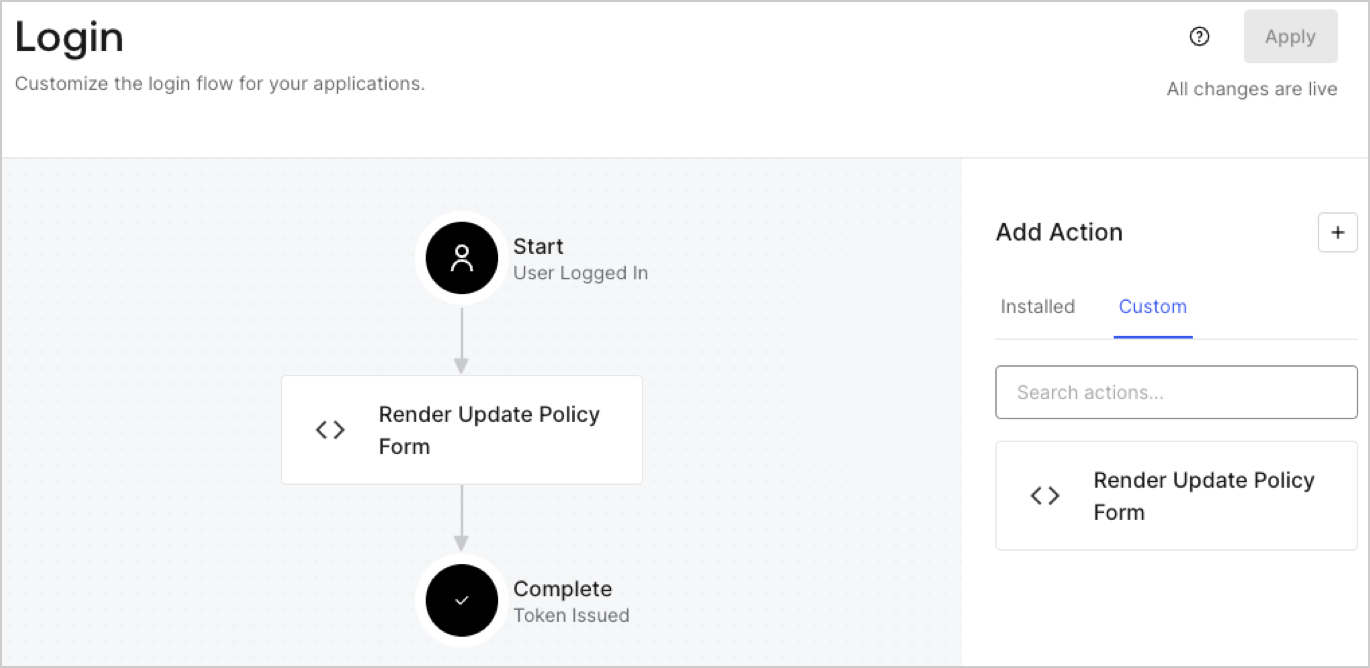
Create a post-login Action to render your form by following these steps:

1. Navigate to **Auth0 Dashboard > Actions > Flows > Login.**
2. Select the **+** icon and Select **Build from scratch**:

   * **Name**: Enter `Render Update Policy Form`.
   * **Trigger**: Select `Login / Post Login`.
   * **Runtime**: Select the recommended version.
3. Select **Create**.

To configure the post-login Action:

1. Delete the existing code from the Code editor.
2. Paste the form render code into the Code editor.
3. Edit the code to define the conditional logic that will render the form.

   ```javascript lines theme={null}
   /**
   * @param {Event} event - Details about the user and the context in which they are logging in.
   * @param {PostLoginAPI} api - Interface whose methods can be used to change the behavior of the login.
   */
   exports.onExecutePostLogin = async (event, api) => {
     const FORM_ID = 'REPLACE_WITH_YOUR_FORM_ID';

     if (event.user.app_metadata.privacy_policies !== true) {
       api.prompt.render(FORM_ID);
     }
   }

   exports.onContinuePostLogin = async (event, api) => { }
   ```

   <Callout icon="file-lines" color="#0EA5E9" iconType="regular">
     The example code above will render the form when a user is missing the app metadata `privacy_policies` property.
   </Callout>
4. Select **Deploy.**
5. Drag and Drop the **Render Update Policy Form** Action to the **Login** flow.
   <Frame>
     <img src="https://mintcdn.com/docs-dev-chore-tenant-logs-autoupdate/c2UUEWdIDibWcc-W/docs/images/cdy7uua7fh8z/5TOwDgevZsBqd7yZynUYWU/41ca909dc3007aed4f40ff794a05efa5/postlogin.png?fit=max&auto=format&n=c2UUEWdIDibWcc-W&q=85&s=0b4d33f7148a30b88094246d9ebc424a" alt="Dashboard > Forms > Use Case > Render update policy form login action" data-og-width="1370" width="1370" data-og-height="668" height="668" data-path="docs/images/cdy7uua7fh8z/5TOwDgevZsBqd7yZynUYWU/41ca909dc3007aed4f40ff794a05efa5/postlogin.png" data-optimize="true" data-opv="3" srcset="https://mintcdn.com/docs-dev-chore-tenant-logs-autoupdate/c2UUEWdIDibWcc-W/docs/images/cdy7uua7fh8z/5TOwDgevZsBqd7yZynUYWU/41ca909dc3007aed4f40ff794a05efa5/postlogin.png?w=280&fit=max&auto=format&n=c2UUEWdIDibWcc-W&q=85&s=a402dd39025966bcde61a77ceceec5df 280w, https://mintcdn.com/docs-dev-chore-tenant-logs-autoupdate/c2UUEWdIDibWcc-W/docs/images/cdy7uua7fh8z/5TOwDgevZsBqd7yZynUYWU/41ca909dc3007aed4f40ff794a05efa5/postlogin.png?w=560&fit=max&auto=format&n=c2UUEWdIDibWcc-W&q=85&s=a693daeb654f1df7c99f7180b07c41f1 560w, https://mintcdn.com/docs-dev-chore-tenant-logs-autoupdate/c2UUEWdIDibWcc-W/docs/images/cdy7uua7fh8z/5TOwDgevZsBqd7yZynUYWU/41ca909dc3007aed4f40ff794a05efa5/postlogin.png?w=840&fit=max&auto=format&n=c2UUEWdIDibWcc-W&q=85&s=9d40842a0bf01d7f6dd20908a9234182 840w, https://mintcdn.com/docs-dev-chore-tenant-logs-autoupdate/c2UUEWdIDibWcc-W/docs/images/cdy7uua7fh8z/5TOwDgevZsBqd7yZynUYWU/41ca909dc3007aed4f40ff794a05efa5/postlogin.png?w=1100&fit=max&auto=format&n=c2UUEWdIDibWcc-W&q=85&s=b05e899815e7e42733d9e1709923ada1 1100w, https://mintcdn.com/docs-dev-chore-tenant-logs-autoupdate/c2UUEWdIDibWcc-W/docs/images/cdy7uua7fh8z/5TOwDgevZsBqd7yZynUYWU/41ca909dc3007aed4f40ff794a05efa5/postlogin.png?w=1650&fit=max&auto=format&n=c2UUEWdIDibWcc-W&q=85&s=109409f70f86bae79fbc20648fffa667 1650w, https://mintcdn.com/docs-dev-chore-tenant-logs-autoupdate/c2UUEWdIDibWcc-W/docs/images/cdy7uua7fh8z/5TOwDgevZsBqd7yZynUYWU/41ca909dc3007aed4f40ff794a05efa5/postlogin.png?w=2500&fit=max&auto=format&n=c2UUEWdIDibWcc-W&q=85&s=160dbf2512d07c7f129223a7948ce450 2500w" />
   </Frame>
6. Select **Apply.**

### Test implementation

Test the implementation by following these steps:

1. Log in with an existing user whose app`_metadata` attribute `privacy_policies` does not have a value.
2. The post-login Action in the Login flow will render the form and prompt for acceptance.
3. Select **Auth0 Dashboard > User Management > Users,** locate the user and verify that the `app_metadata` attribute `privacy_policies` contains a `true` value and a timestamp.
